OpenArt × Seedance 2.0
Hey — thanks for grabbing this! Today we're using OpenArt to turn a clip of you doing something ordinary into the loading screen of a AAA game that doesn't exist.
Three versions below, every prompt included. Experiment with them, and tag me in whatever you make.
Go to: OpenArt and make an account.
From the home screen choose Image → Image Generator, then set the model to GPT Image 2.0. This is where you build the still loading screen — your anchor frame. Everything downstream inherits it, so don't move on until the face genuinely looks like you.
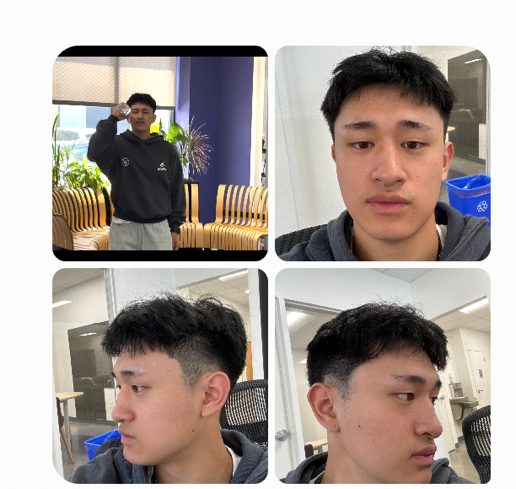
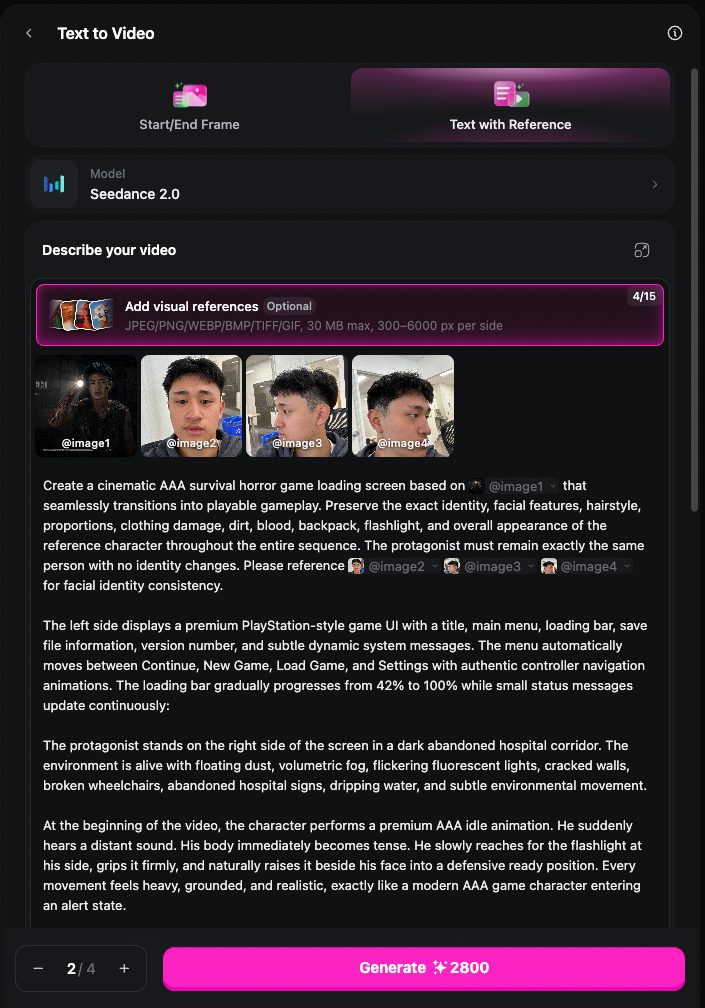
Choose Video → Text to Video. Pick the Text with Reference tab (not Start/End Frame), set the model to Seedance 2.0, then open Add visual references and load four images in this exact order:
| Slot | What goes here | Its job |
|---|---|---|
| @image1 | Your anchor frame | Sets the look of the whole video |
| @image2 | Face — front | Identity lock |
| @image3 | Face — ¾ left | Identity lock |
| @image4 | Face — ¾ right | Identity lock |
The app labels each thumbnail as you add it. Check the labels match before you generate — the prompts point at these numbers, so a wrong order means the prompt is describing the wrong picture.
Start here. It's the most forgiving of the three — the exosuit hides your body, so the AI only has to keep your face consistent.
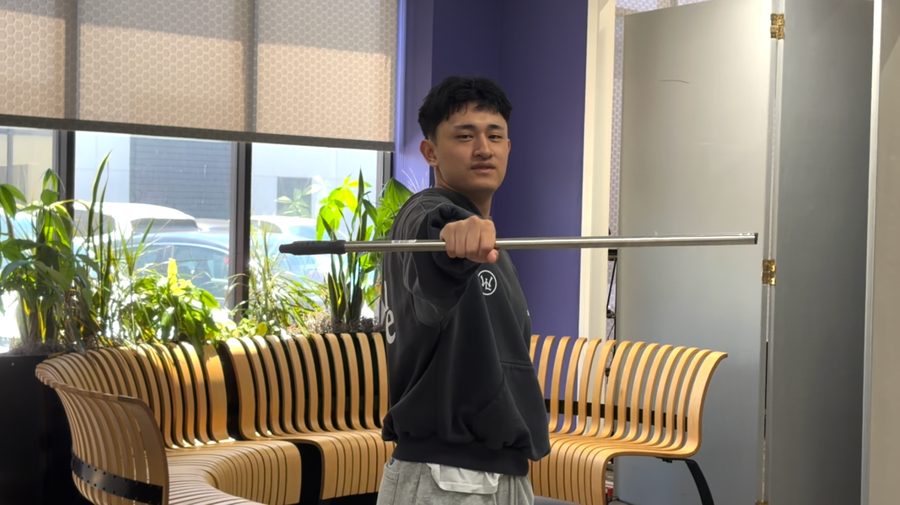
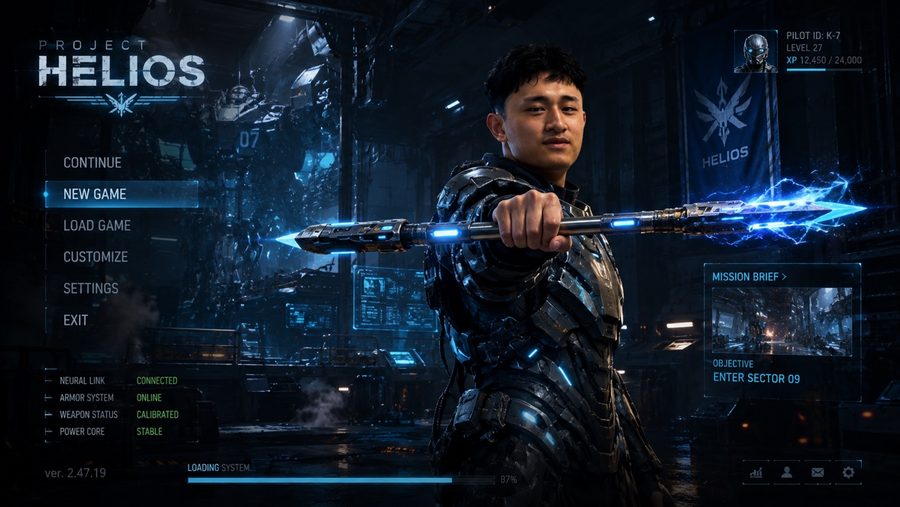
Here, choose GPT Image 2.0 and paste the prompt below + input the photo of you holding the stick. Set 16:9.
Create an ultra-realistic 16:9 AAA sci-fi action game loading screen.
Maintain the exact identity of the reference person.
The composition matches the reference photo.

The protagonist stands on the right side extending a futuristic energy spear directly toward the camera. The ordinary staff has transformed into a high-tech plasma weapon with glowing energy cores, mechanical components, floating rings, and blue energy.

He wears a sleek futuristic exosuit made from titanium, carbon fiber, and glowing blue energy lines.

The background is a massive futuristic military facility filled with holograms, drones, robotic arms, volumetric lighting, smoke, sparks, and cinematic machinery.

Minimal console-style UI on the left:
PROJECT HELIOS / CONTINUE / NEW GAME / LOAD GAME / SETTINGS

Photorealistic. Unreal Engine 5. AAA console presentation.
To animate it: in Seedance 2.0, load the image you got above as @image1 + your three face photos as @image2–@image4, then paste the prompt below.
Create a cinematic AAA sci-fi action game loading screen based on @image1 that seamlessly transitions into playable gameplay. Preserve the exact identity, facial features, hairstyle, body proportions, and expression of the reference person throughout the entire sequence. The protagonist must remain exactly the same person with no identity changes. Reference @image2 @image3 @image4 for facial identity consistency.

The scene begins inside a colossal futuristic military facility presented as the main menu of a premium AAA sci-fi game. The environment is alive with towering industrial architecture, robotic arms, flying drones, holographic displays, floating particles, volumetric lighting, cinematic smoke, sparks, and constantly moving mechanical systems.

The protagonist stands on the right wearing a sleek powered exosuit of titanium alloy, carbon fiber panels, glowing blue energy lines, and adaptive mechanical joints. His face remains fully visible and perfectly recognizable.

The original metal staff has transformed into an advanced energy spear with a glowing plasma core, expanding mechanical components, rotating magnetic rings, animated circuitry, and subtle electrical arcs.

He confidently extends the energy spear directly toward the camera, holding the pose like the hero character on a AAA loading screen, while performing premium idle animations: natural breathing, subtle grip adjustments, small realistic finger movements. The armor recalibrates with tiny mechanical adjustments. Blue energy pulses softly. The spear emits a gentle glow and releases small floating energy particles.

The camera slowly pushes forward with subtle cinematic movement around the character.

On the left side, display a clean minimalist AAA game menu:
PROJECT HELIOS / CONTINUE / NEW GAME / LOAD GAME / SETTINGS

The menu automatically scrolls downward until NEW GAME is highlighted. The selection pauses briefly. A realistic controller confirmation sound. CLICK.

Immediately, the world transforms. The UI dissolves. Without any visible cuts, the camera rapidly swings behind the protagonist and settles into a cinematic third-person over-the-shoulder gameplay camera.

At the same moment, the facility powers on. Massive blast doors open. Blue energy cores illuminate one after another. Emergency warning lights flash. Industrial machinery activates throughout.

The gameplay HUD fades on.
MISSION — Reach Sector 09
OBJECTIVE — Activate the Central Reactor

The protagonist lowers the spear into a combat-ready stance and walks deeper into the facility. The camera follows from behind exactly like real AAA gameplay. Drones patrol overhead. War machines move in the distance. Finally, deep within the facility, a colossal mechanical boss dozens of meters tall slowly powers on, its eyes illuminating beneath dramatic volumetric lighting.

Ultra-realistic Unreal Engine 5 quality. Photorealistic human animation. Premium sci-fi production design. Cinematic lighting. Seamless loading-screen-to-gameplay transition. Preserve the exact facial identity throughout. Sound effects only. No background music.
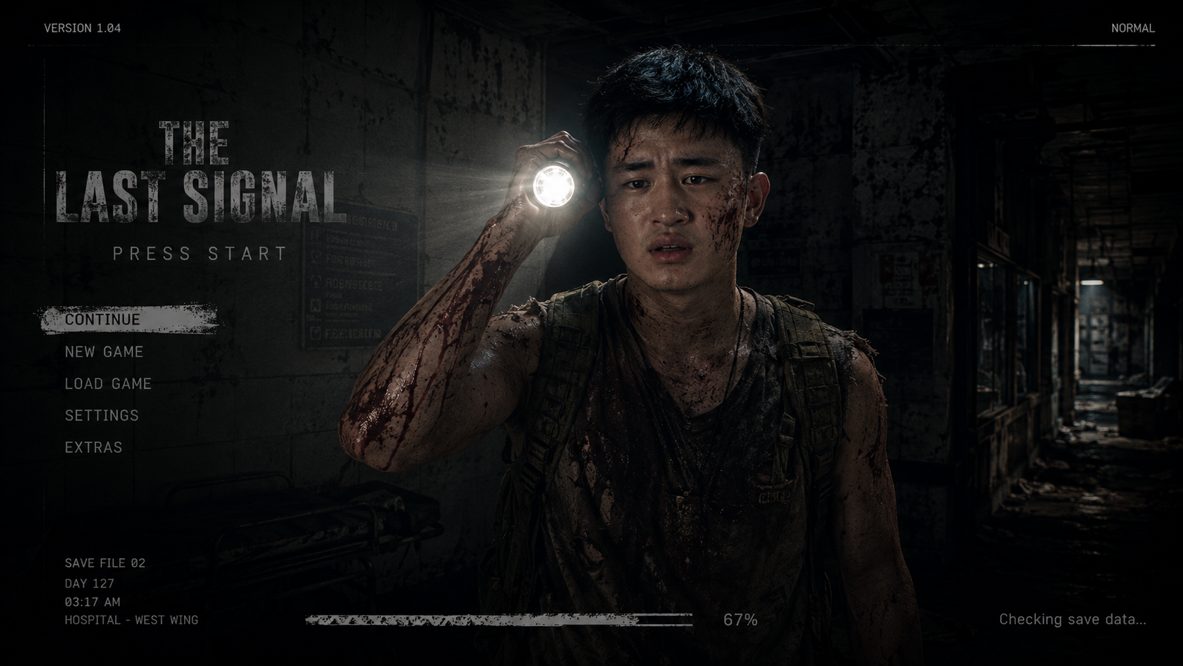
The best performer. The flashlight does the work: it's the light source, so the AI has an obvious reason to build darkness around it.
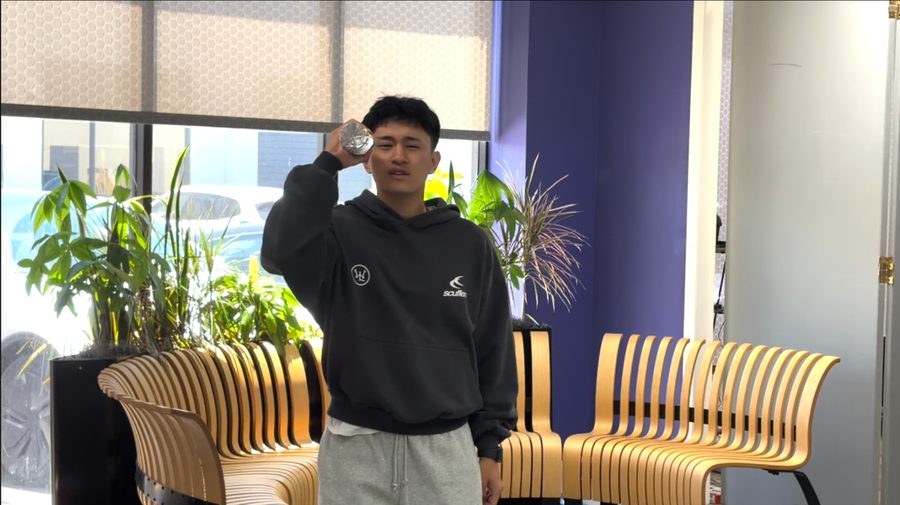
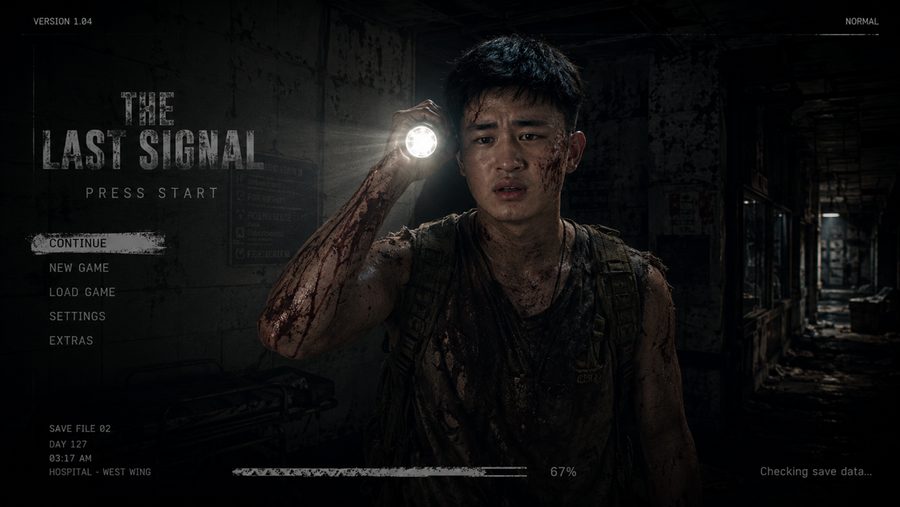
Here, choose GPT Image 2.0 and paste the prompt below + input the photo of you raising the flashlight. Set 16:9.
Create an ultra-realistic 16:9 AAA survival horror game loading screen.
The composition is identical to the reference photo.

The protagonist stands on the right side of the frame holding a powerful flashlight raised beside his face. Maintain the exact identity, facial features, hairstyle, proportions, and expression of the reference person.

He wears torn explorer clothing, a ripped tactical sleeveless shirt, and a tactical backpack, covered in dirt, dried blood, scratches, sweat, and mud. The flashlight is the primary light source.

The background is a dark abandoned hospital corridor with volumetric fog, floating dust, broken wheelchairs, blood stains, cracked walls, and flickering fluorescent lights.

Minimal console-style UI appears on the left:
CONTINUE / NEW GAME / LOAD GAME / SETTINGS

Photorealistic Unreal Engine 5 quality. Cinematic lighting. Film-quality rendering. AAA console presentation. No anime. No stylization. True 3D realistic human.
To animate it: in Seedance 2.0, load the image you got above as @image1 + your three face photos as @image2–@image4, then paste the prompt below.
Create a cinematic AAA survival horror game loading screen based on @image1 that seamlessly transitions into playable gameplay. Preserve the exact identity, facial features, hairstyle, proportions, clothing damage, dirt, blood, backpack, flashlight, and overall appearance of the reference character throughout the entire sequence. The protagonist must remain exactly the same person with no identity changes. Reference @image2 @image3 @image4 for facial identity consistency.

The left side displays a premium console-style game UI with a title, main menu, loading bar, save file information, and subtle dynamic system messages. The menu automatically moves between Continue, New Game, Load Game, and Settings with authentic controller navigation animations. The loading bar gradually progresses from 42% to 100% while small status messages update continuously.

The protagonist stands on the right side of the screen in a dark abandoned hospital corridor. The environment is alive with floating dust, volumetric fog, flickering fluorescent lights, cracked walls, broken wheelchairs, abandoned hospital signs, dripping water, and subtle environmental movement.

At the beginning, the character performs a premium AAA idle animation. He suddenly hears a distant sound. His body becomes tense. He slowly reaches for the flashlight, grips it firmly, and raises it beside his face into a defensive ready position. Every movement feels heavy, grounded, and realistic. His breathing becomes heavier. His expression transitions from calm to fearful yet determined. He slowly scans the darkness with the flashlight, turns his head left and right, and cautiously takes a small step forward.

The flashlight realistically illuminates floating dust, cracked walls, blood stains, broken wheelchairs, and thick volumetric fog, creating cinematic horror lighting.

As the loading bar reaches 100%, the menu automatically highlights NEW GAME without any visible cursor. A satisfying controller confirmation sound. CLICK.

Instantly, the entire world changes. The loading screen UI smoothly fades away. Without any visible cuts, the camera performs a fast cinematic orbit around the protagonist before settling naturally behind his shoulder into a true third-person over-the-shoulder gameplay camera.

At the same moment, the hospital regains partial power. Deep red emergency lights flash. The hallway lights flicker violently. A distant alarm briefly activates. Dust falls from the ceiling. Heavy metal doors creak open. The protagonist raises the flashlight higher and cautiously explores deeper into the corridor.

A minimal gameplay HUD fades onto the screen.
OBJECTIVE — Find the Fuse
Lower-right corner: Flashlight Battery 82%

At the very end of the hallway, beneath the flashing emergency lights, a horrifying humanoid creature silently appears for less than one second.

Ultra-realistic Unreal Engine 5 quality. Photorealistic human animation. Grounded character performance. Natural flashlight physics. Cinematic horror atmosphere. Smooth AAA gameplay transition. No glitches. No morphing. Preserve the exact identity of the reference character throughout. Sound effects only. No background music.
The hardest of the three, and the one people actually re-watch. Two faces to keep consistent instead of one.
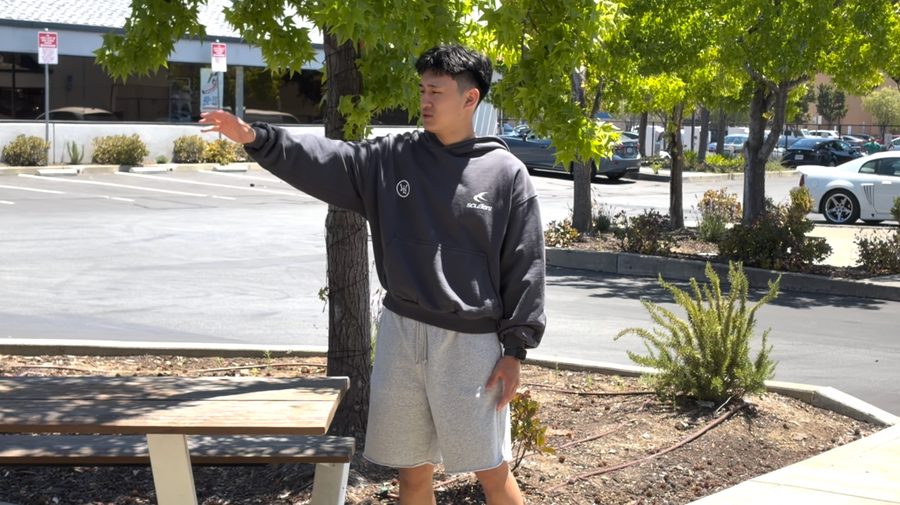
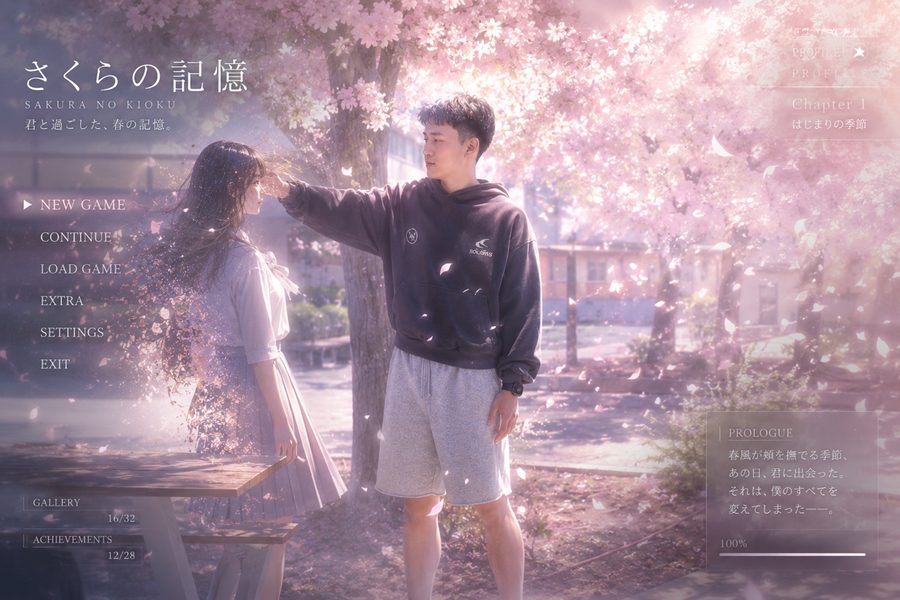
Here, choose GPT Image 2.0 and paste the prompt below + input the photo of you reaching toward her. Set 16:9.
Create an ultra-realistic 16:9 Japanese romance visual novel loading screen.
Maintain the exact identity of the reference man.
Keep the composition identical to the reference image.

The male protagonist stands on the right reaching toward a girl standing on the left. The environment is a cherry blossom park during golden hour. Warm sunlight shines through thousands of sakura trees. Pink petals drift gently through the air. The atmosphere is nostalgic, peaceful, bittersweet, and cinematic.

Minimal Japanese visual novel UI:
NEW GAME / CONTINUE / LOAD GAME / SETTINGS

Elegant white typography. Soft pink accents. Photorealistic 3D. Makoto Shinkai-inspired atmosphere. Not anime. True cinematic human rendering.
To animate it: in Seedance 2.0, load the image you got above as @image1 + your three face photos as @image2–@image4, then paste the prompt below.
Create an ultra-realistic AAA romance visual novel game loading screen based on @image1 that seamlessly transitions into an emotional in-game cinematic. Preserve the exact identity, facial features, hairstyle, body proportions, and expression of the reference protagonist throughout. Reference @image2 @image3 @image4 for facial identity consistency.

The entire sequence should feel like a premium AAA romance game rendered in cinematic CGI rather than anime illustration. The composition must remain identical to the reference image without changing framing, character positions, or camera angle.

The male protagonist stands on the right, slowly extending his right hand toward the girl standing on the left. The scene takes place beneath countless blooming cherry blossom trees during golden hour. Warm sunset light filters through the branches. Petals continuously drift through the air. The atmosphere is peaceful, nostalgic, bittersweet.

A clean and elegant Japanese visual novel interface appears subtly around the edges of the screen with delicate white typography and soft pink accents. The UI remains minimal and never distracts from the emotional moment.

Time gradually slows. The world becomes almost completely silent. As the protagonist's fingertips gently touch the girl's fingertips, everything seems to stop. She smiles softly with warmth and quiet acceptance.

Then she slowly begins dissolving into glowing cherry blossom petals. Her fingertips disappear first. Then her hands. Her arms. Her shoulders. Finally her entire body gently transforms into countless glowing sakura petals and tiny particles of light. The transformation is slow, graceful, and poetic. No explosion. No shattering. Only the feeling that the spring wind is carrying away a precious memory.

The instant she disappears, a warm spring breeze sweeps through the scene. Millions of petals burst into the air, filling the frame, swirling around the protagonist in slow motion until the screen becomes a sea of pink. The camera slowly pushes forward through the petals. Golden sunlight shines through them, creating lens bloom, dreamy volumetric lighting, and delicate cinematic bokeh.

As the petals settle, the girl has completely vanished. Only the protagonist remains, hand still extended toward the empty space, his expression filled with longing, loss, and acceptance. Several petals gently land in his open palm.

The interface softly remains on screen. The menu automatically highlights NEW GAME. It pauses briefly. A gentle controller confirmation sound. CLICK. The interface fades away.

Without any visible cuts, the camera gently moves behind the protagonist into a third-person gameplay camera. Chapter information softly fades on.
CHAPTER 1 — The First Spring

The protagonist slowly begins walking beneath the endless cherry blossom trees. Petals continue falling around him. The atmosphere remains quiet, dreamlike, and bittersweet.

Ultra-realistic 3D human rendering. Film-quality CGI. Japanese romance visual novel aesthetic. Dreamlike cinematic lighting. Soft depth of field. Emotional character performance. Seamless transition from loading screen to gameplay. Preserve the exact facial identity throughout. Sound effects only. No background music.
All three are fills of one skeleton. Swap five variables and you have infinite versions: the genre, your real prop, what it becomes, the environment, and the objective text on the HUD.
Create an ultra-realistic 16:9 AAA [GENRE] game loading screen.
The composition is identical to the reference photo.
Maintain the exact identity, facial features, hairstyle, and proportions of the reference person.

The protagonist stands on the right side holding [UPGRADED PROP].
He wears [COSTUME].
The background is [ENVIRONMENT] with [3-4 ATMOSPHERIC DETAILS].

Minimal console-style UI on the left:
CONTINUE / NEW GAME / LOAD GAME / SETTINGS

Photorealistic Unreal Engine 5 quality. Cinematic lighting.
No anime. No stylization. True 3D realistic human.
Film the clip today. A bad first attempt teaches you more than reading this twice.
Press Start